
AI oversight for education apps
Say yes to AI and keep the final say.
Tulga reviews students' conversations with AI against their age, sound pedagogy and your school's rules. When it spots a risky moment, it brings it to the person you designate, with the quote and the reasoning.
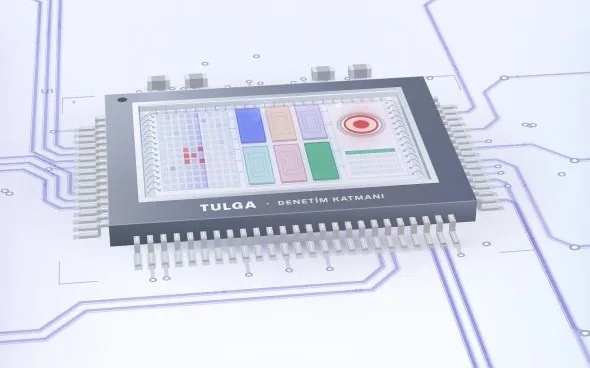
Tulga
Tulga is an oversight layer that reads the student's message, the app's AI response and the educational context together. In observation mode, the app's response goes through unchanged, and Tulga keeps a record with its reasoning for every review. Intervention is limited to critical situations your institution defines in advance, and the person you designate makes the final decision.
- Format
- An oversight layer that connects to the education app, plus a review panel for your institution
- Who it's for
- Schools and institutions that use AI apps, and the teams that build those apps
- In your school
- Overseeing the AI apps your students use and tracking findings within your institution
- Outcome
- A file for each finding with the quote, reasoning, owner and status, plus a re-evaluation after the fix
How it works
Every finding has an owner.
- 1
Set the rules
Your institution decides up front the age context, the review topics, the scope of intervention and who reviews findings. Tulga works by your rules.
- 2
Connect the app
The app is connected so its AI requests and responses pass through Tulga. We decide together during setup which data gets processed.
- 3
Start with observation
In observation mode, the app's response reaches the student unchanged. Tulga keeps a record with its reasoning for every review.
- 4
Review findings
A risky interaction goes to the review team you designate, with the quote and the reasoning. Who is handling the file and what stage it's at are visible in the same place.
- 5
Fix it, then check again
The action taken goes on record. After the fix, the app is re-evaluated against the same criteria, so you can see whether the fix worked.
What’s included
Tulga reads each conversation in context.
Review that weighs context
The student's question, the app's answer and the educational context are judged in the same evaluation. An answer that fits one age can be a problem at another, so Tulga takes the age group and assignment type into account.
Child safety and beyond
Child safety, privacy, fit for age and curriculum, academic accuracy, respect for culture and belief, the need for support. Your institution decides which topics to review.
Quiet pedagogical risks
Not every risk stands out. Tulga also reviews answers that make students dependent on the AI, claim authority without evidence, do the thinking for them or delay them from asking for help.
Observe first, step in when needed
In observation mode, the app keeps running as usual. Intervention applies only in critical situations your institution defines, and it is limited to the risky response in question.
Findings with written reasoning
Each finding is recorded with the relevant quote, the reasoning, the responsible team and its current status. The fix and the re-evaluation are tracked in the same file. The answer to “Why was this flagged?” is already there.
All programs in one panel
Your institution sees the AI programs it monitors, open findings and review status in one panel.
Who gains what
The AI does the work. Control stays with your school.
Institution
Writes its own rules: age context, usage rules, scope of intervention, who reviews what. When a parent asks “How is this monitored?”, it has a process to explain and records to show.
Tulga
Reads the message and the response together, and flags a risky interaction with the quote and the reasoning. It doesn't diagnose or hand out penalties. It prepares the file and puts it in front of the person you designate.
The person you designate
Doesn't read every conversation one by one. Looks at the finding in front of them, its quote and its reasoning, and decides according to the institution's process. A specialist makes the call on support.
FAQ
Questions before you decide.
Does Tulga change the app's responses?
Not in observation mode. The response belongs to the app and goes through unchanged. Intervention happens only in critical situations your institution sets in advance, and it is limited to the risky response in question. The scope, and who can undo an intervention, are also set up front.
Who makes the final decision?
The person your institution designates. Tulga flags the risky interaction and writes down its reasoning. It does not diagnose. A single automated finding does not mean a decision to sanction the app. A specialist decides whether the student needs support.
Which risks does it review?
Child safety, privacy, fit for age and curriculum, academic accuracy, respect for culture and belief, and the need for support. Quieter pedagogical risks, such as emotional dependence and thinking for the student, are also covered.
How does it connect to the app, and what data is processed?
The app is connected so its AI requests and responses pass through Tulga. During setup, we decide with your institution which data is processed, how long it's kept and who can see it.
Does it replace teachers or school counselors?
No. Tulga makes the work of teachers and counselors easier. It doesn't make decisions for them. How urgent a risk is, and whether it's ongoing, is handled through your authorized process. What the student has learned is assessed separately, through their own independent work.
Also worth a look
These can help as well.
Let’s talk
Monitor AI in your school by your own rules.
Let's use the call to settle which apps you want to connect, your review rules and who at your school will follow up on findings.